Why HTML Is Still Important
published: 2026-10-30
read time: 8 minutes
<html>cool website</html>Fuck substack. HTML was all we ever needed.
HTML stands for Hyper Text Markup Language.
HTML was first created in 1991. It’s official release was in 1993. Even in the days of dial-up HTML could efficiently send information from a server to your computer’s browser in seconds.
The bottle neck at the time was the computers themselves. Web pages rendered slowly because browsers and computer’s were slow.
By the mid 90’s, the human race had already created the best tool in human history to access, document & share information, and it was available to everyone who had an internet connection. Once companies started appearing online more and more people were trying to figure out a way to carve up the web for profit and privatize one of humanities greatest achievements. With corporations attempting to monopolize the web collective use and knowledge of HTML began to shrink, along with the amount of DIY sites.
HTML was designed so that anyone could use it. HTML is not a programming language. It is a mark up language. You do not need a CS degree to build a website. There was a brief renaissance where DIY sites ruled the internet. Now everything is just same 5 websites. Before Twitter and Reddit there were dedicated forums. Before discord, chatrooms and IIRC. Before Linktree there were personal sites. Before substack, there were personal blogs.
Two sites that have always irked me a bit are Linktree & Substack. Does this make me a pretentious asshole? Yes, but this is my site and I do whatever I want and right now I want to complain. First and foremost, Linktree & Substack and what they offer is fine in itself. I think for the average person they are fine. I understand the appeal. With linktree you can have all of your links in one place without having to waffle about with writing html and getting a web domain. The same could be said with Substack, you can get a blog without having to build a blog. I get it.
As an experiment let me re-create linktree:
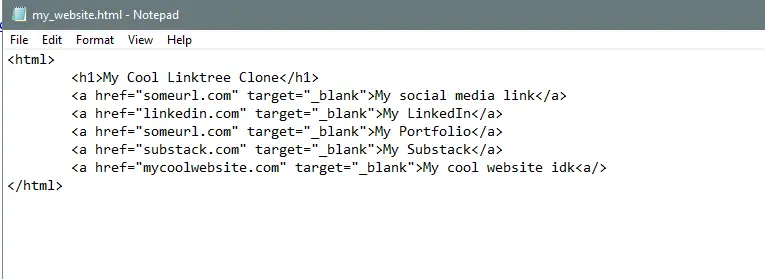
<html>
	<a href="someurl.com" target="_blank">My social media link</a>
	<a href="linkedin.com" target="_blank">My LinkedIn</a>
	<a href="someurl.com" target="_blank">My Portfolio</a>
	<a href="substack.com" target="_blank">My Substack</a>
	<a href="mycoolwebsite.com" target="_blank">My cool website idk</a>
</html>
target="_blank"will open the link in a new tab.
Throw this in a text file:
Open it in your browser and voilà:
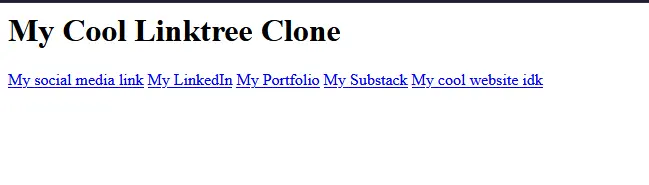
Upload your html file to neocities (free hosting site with a detailed tutorial on how to get started) and you have yourself a website. No giving away tons of personal information, no payment & its yours.
Now let’s do substack:
<html>
	<h1>My Cool substack clone</h1>
	<h2>Today I am launching my own site with my personal writing</h2>
	<p>October 30th, 2026</p>
	<p>blah blah blah. Does anyone even read this sh!t?</p>
</html>
Throw this in notepad and save as
blog.htmlor some other name just make sure it ends in.html.
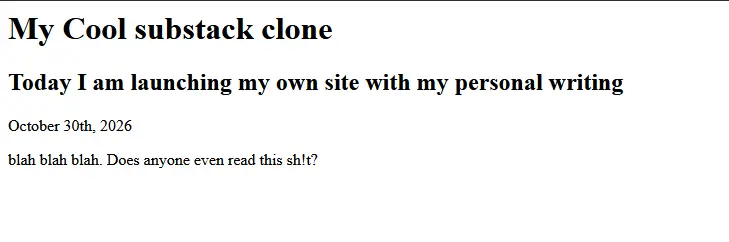
Every time you want to write you can create a new entry with the <p> tag. The <p></p> tag is how you create a paragraph in html.
h1is header 1. header 1 is a large header.h2is a smaller header. Add a number next tohand you get a smaller header. i.e.<h3>smaller than h2</h3><h4>smaller than h3</h4>.
Actually, let me make a site that combines it all so that everything is in one place:
<html>
	<h1>My Cool Site</h1>
	<p>my links:</p>
	<a href="someurl.com" target="_blank">My social media link</a>
	<a href="linkedin.com" target="_blank">My LinkedIn</a>
	<a href="someurl.com" target="_blank">My Portfolio</a>
	<a href="substack.com" target="_blank">My Substack</a>
	<a href="mycoolwebsite.com" target="_blank">My cool website idk</a>
	<hr />
	<h2>My Cool substack clone</h1>
	<h3>Today I am launching my own site with my personal writing</h2>
	<p>October 30th, 2026</p>
	<p>blah blah blah. Does anyone even read this sh!t?</p>
</html>
<hr />is a thematic break. It draws a line across the page.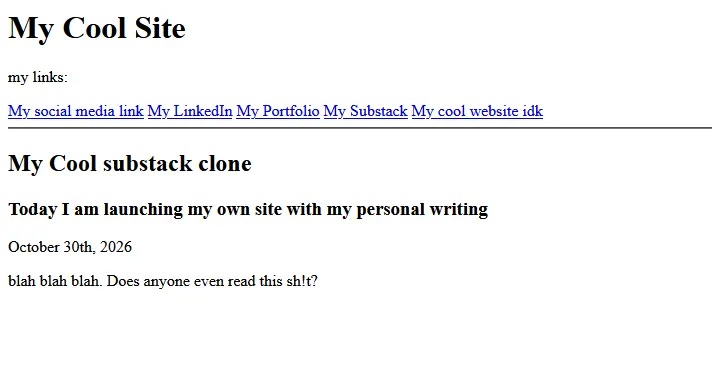
This is a rugged and simple example, but if you wanted to get started as fast as possible, it works. You could use this right now. Feel free to copy my code. Play around with it. A benefit of HTML is that it is designed be readable on any screen. To personalize just add some CSS. Checkout my example below.
The appeal of linktree and substack is that they offer a nice looking website with very little tinkering, if any at all. Truthfully, that’s very compelling. Maintaining a website can be tedious, but here’s a dirty truth about the web: If your site doesn’t have any javascript or server side functionality then it will never break. Unless you write some janky html or css (even then its actually hard to do because HTML & CSS are very forgiving). Static sites are just text on a screen. HTML and CSS are not programming languages. They are markup texts that just tell your browser how to render stuff on the page. That’s it. Today HTML & CSS are super powerful, and that’s because modern browsers can do a lot of cool stuff. HTML and CSS is text in a file until a browser reads the text file. Then the browser decides on how to render the page based on the content you write in your HTML file. Don’t let some company decide how your site looks.
Several companies have convinced us that the web is a complicated place and that web design is hard. That is not entirely true. What is true is that the web development iceberg goes deep, so depending on what you want to build the project itself can range from simple to complex. Building website is only as complex as you make it. It can be simple with HTML. This is why we should still care about it. I promise you, you can get a website up in running in minutes. You can build out a whole site that looks cool and feels personal in a weekend. All you have to do is sit down and do it. Maybe read a little bit. You can ask AI I guess, but please don’t. Learn it yourself. It is a freeing and gratifying experience. Don’t let AI or some company take that from you.
Free Starter Template
You can copy and paste this into an html file and use it as your site.
<!DOCTYPE html>
<html lang="en">
  <head>
    <meta charset="UTF-8">
    <meta name="viewport" content="width=device-width, initial-scale=1.0">
    <meta http-equiv="X-UA-Compatible" content="ie=edge">
    <title>HTML 5 Boilerplate</title>
  </head>
  <body>
	<h1>My Cool Site</h1>
	<p>my links:</p>
	<nav>
		<a href="someurl.com" target="_blank">My social media link</a>
		<a href="stinkedIn.com" target="_blank">My LinkedIn</a>
		<a href="someurl.com" target="_blank">My Portfolio</a>
		<a href="substack.com" target="_blank">My Substack</a>
		<a href="mycoolwebsite.com" target="_blank">My cool website idk</a>
	</nav>
	<hr />
	<h2>My Cool substack clone</h1>
	<h3>Today I am launching my own site with my personal writing</h2>
	<p>October 30th, 2026</p>
	<p>blah blah blah. Does anyone even read this sh!t?</p>
  </body>
  <style>
	/* HTML color picker: https://www.w3schools.com/colors/colors_picker.asp */
	html {
		width: 100%;
		height: auto;
		background-color: #2E3440; /* change background here */
	}

	body {
		width: 90%;
		display: block;
		margin: 0 auto;
		color: #F4F5F7; /*change font color here */
		font-size: 20px;
		line-height: 1.16;
	}

	nav {
		display: flex;
		flex-direction: column;
		gap: 12px;
	}

	a { color: #4C6FFF;} /* change link color here */
	a:hover {color: #7C96FF;} /* change link color on hover */

  </style>
</html>
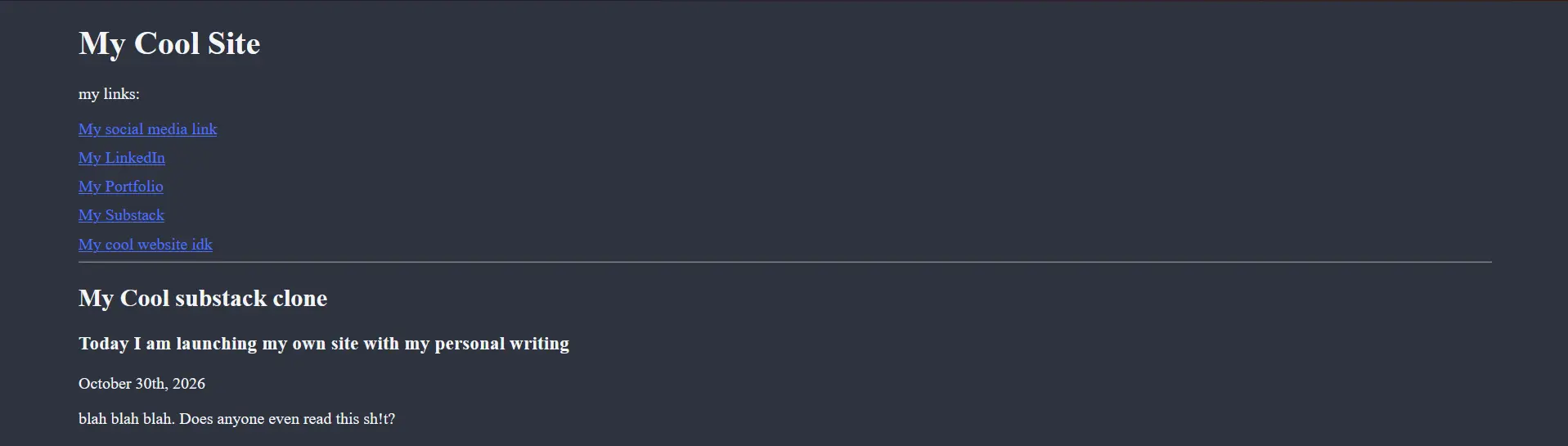
Feel free to use this, copy it, modify it, break it, re-write it, go crazy.
Code Editors
While HTML and CSS are not programming languages the following code editors have create tools for writing web pages:
visual studio code - microsoft product
- microsoft free alternative: vscodium
Tutorials
https://neocities.org/tutorials - goated tutorial designed for absolute beginners
https://www.w3schools.com/htmlcss/default.asp - classic tutorial
https://www.freecodecamp.org/learn/responsive-web-design-v9/ - a super interactive tutorial.
Good Examples
https://motherfuckingwebsite.com/
Happy Halloween
                           Jgy__
                         jWW  `""9Wf
                       _#WWW     IW
                      jWWWWW     IW
              __,yyyyyWWWWW     IWyyyy___
         _jyWWP"^``"`.C"9*,J _.mqD:^^"WWWWWWQg__
       jgW"^.C/"    .C'     I    `D.     'D._"WQg_
     jWP` .C"       C'      I     `D._     `D._ "Qg_
   jQP`  .C    ,d^^b._      I      _.d^^b.   `D._ "Qg
  jQ^  .C"   /`   .+" \     I     / "+.   `\   `D.  XQ
 jQ'  .C'   |`  ."    )    _I    (     ".  |    `D.  4#
 Qf  .C     (   (    /    / /\    \     )  )     `D.  Qg
jW   C'      \__\_.+'    / /  \    `+._/__/       `D  jQ
Qf   C         C        /_/    \         D         D   Qk
Qf   C      _  C        \_\____/         D  _      D   QF
QL   C      \`+.__     _______     ______.+'/      D   QF
B&   C.      \   \|    ||     |    ||      /       D   Qf
jQ   `C.      \   |____|/     |____|/__   /      .D'   jW
 TQ   `C.      \._   `+.__________/___/|_/      .D'   jQ`
  9Q   `C.      C.`+._           |   |/.D'     .D'   jQ'
   "Qg  `C.     `C.   `"+-------'   ' .D'     .D'   pW`
    ^WQy `C.     `C.        I        .D'    _.D' yW"
      ^9Qy_`C.    `C.       I       .D'   _.D jgW"
         `9WQgC.__ `C.      I      .D'  _.Dp@@"`
        ilmk `""9WQQggyyyyyygyyyyyQggQWQH""